What's New in the NetSec Platform
Multiple Virtual Routers Support on SD-WAN Hubs
Table of Contents


Multiple Virtual Routers Support on SD-WAN Hubs
Multiple virtual routers on the SD-WAN hub allow you to use overlapping subnet IP
addresses on the branches that connect with the same SD-WAN hub.
With earlier SD-WAN plugin versions, you can't have SD-WAN configurations on multiple
virtual routers. By default, a sdwan-default virtual router is created and it
enables Panorama to automatically push the router configurations. Due to this
restriction, customers faces difficulty and spends additional effort in some of the
SD-WAN deployments:
- User Scenario: Overlapping IP addresses from different branches connecting to the same hub.
- Single Virtual Router Configuration on SD-WAN Hub: Customers may need to reconfigure the overlapping subnets to unique address spaces.
- Multiple Virtual Routers Configuration on SD-WAN Hub: Enable Multi-VR Support on the SD-WAN hub device. The traffic from different branches is directed to different virtual routers on a single hub to keep the traffic separate.
- User Scenario: Government regulations that disallow different entities to function on the same virtual router.
- Single Virtual Router Configuration on SD-WAN Hub: Customers won’t be able to separate routing of different entities with a single virtual router.
- Multiple Virtual Routers Configuration on SD-WAN Hub: Enable Multi-VR Support on the SD-WAN hub device to keep the traffic of different entities separate. Multiple virtual routers on the SD-WAN hub maps the branches to different virtual routers on the hub that provides logical separation between the branches.
SD-WAN plugin now supports multiple virtual routers on the SD-WAN
hubs that enable you to have overlapping IP subnet addresses on branch
devices connecting to the same SD-WAN hub. Multiple virtual routers can run multiple
instances of routing protocols with a neighboring router with overlapping address
spaces configured on different virtual router instances. Multiple virtual router
deployments provide the flexibility to maintain multiple virtual routers, which are
segregated for each virtual router instance.
However, the number of virtual routers supported on the PAN-OS SD-WAN hub
varies by platform.
Benefits:
- A hub with multiple virtual router configuration logically separates the routing for each branch office that it is connected with.
- Branches sharing the same SD-WAN hub can reuse the same IP subnet address.
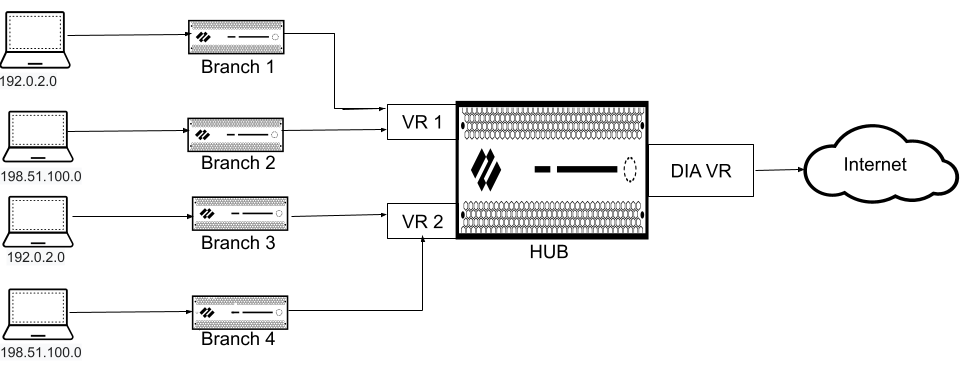
The following figure illustrates an SD-WAN hub with two virtual routers. By enabling
multiple virtual routers support on the SD-WAN hub, the four branches
connecting to the same SD-WAN hub (but different virtual routers) can have
overlapping IP subnets or belong to different entities and function independently
because their traffic goes to different virtual routers.