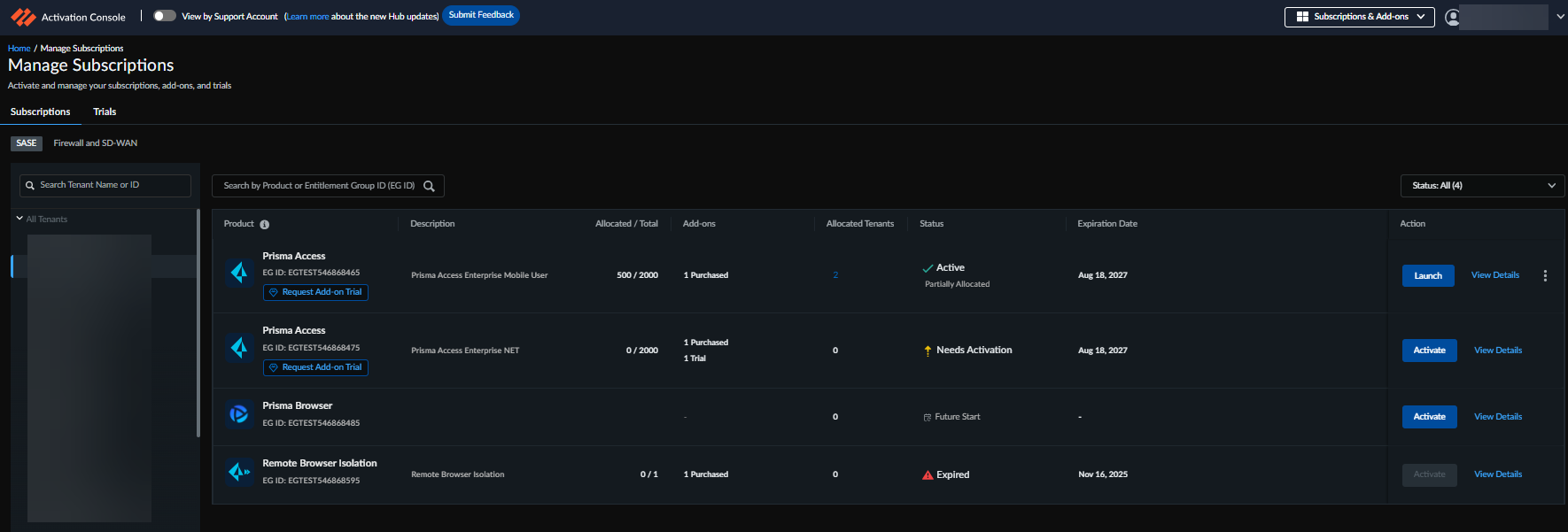
Contains details of the new unified activation experience
Important: We are rolling out this new, unified activation experience in
stages. For supported SASE products, you may see the new activation console now,
or you maybe directed to use the Hub for activation until the update reaches
your tenant.
Introducing a unified and simplified activation and onboarding
experience for all SASE products through the redesigned Activation
Console (formerly called the Hub). This
centralizes all activation and license management tasks in a single, streamlined
portal, allowing administrators to view, activate, and manage SASE products
efficiently. Products can now be activated at any time directly from the console,
eliminating reliance on magic links. Newly purchased products are automatically
added to the default Customer Support Portal (CSP) account, reducing manual steps
and avoiding complications if the CSP is changed after activation. All SASE products
can now be managed from one interface, improving visibility, control, and
operational efficiency.
This experience is available for the following SASE products:
Prisma Access
Prisma Browser
Remote Browser Isolation
CASB-X
Data Security
AI Access Security
SaaS Security Posture Management
Enterprise DLP
The Firewall and SD-WAN products (Next-Generation Firewall,
SD-WAN) continue to use existing activation and license
management workflows. There are no changes to tenant management, subscription views,
or activation processes for these products.
Key Changes in Activation and Subscription Management for SASE Products
Centralized Activation and Management
All SASE product activations and license
management are now performed through the
Subscriptions & Add-ons page in the
Activation Console, providing a single,
unified interface.
Magic links and authorization codes are no longer required; a
Welcome Email provides a direct link to the Activation
Console, from where the product can be activated.
The Subscriptions & Add-ons page
offers a consolidated overview of all products, including active
subscriptions, add-ons, and trials.
The product amendment, renewal, and activation status are
automatically updated in the Activation Console.
Starting with activation, all lifecycle operations, including
adding or removing add-ons, renewing subscriptions, and making
amendments, can now be performed directly from the
Subscriptions & Add-ons page in
the Activation Console.
Automatic CSP Assignment
New products are now automatically added to the primary Customer Support
Portal (CSP) account with a primary Tenant Service Group (TSG), making them
immediately available for activation. This eliminates the need for manual CSP
selection, reduces errors, and ensures a smoother activation experience.
Subscription Management
The Subscriptions & Add-ons page now contains two
tabs:
SASE tab – Lists all SASE products. Within this
tab:
Trials – Displays all trial
products.
Subscriptions – Lists subscribed
products that are either activated or ready to be
activated.
Firewall and SD-WAN tab – Lists all the firewall
and SD-WAN products that will follow the old activation
process.
In the Strata Cloud Manager, you can only view the subscription
list, but all activation and management operations must be performed
through the Subscriptions & Add-onspage in
the Activation Console.
For multitenant environments, the Subscriptions
& Add-onspage includes a Tenant Browser that shows
the tenant hierarchy. Administrators can switch between tenants to view
products that are activated or waiting to be activated on each tenant
and see high-level details such as license allocations.
The Serial Number previously used to identify a product is now
referred to as the Entitlement Group ID.
Tenant Management
All operations on the subscriptions that were previously performed from Tenant
Management must now be performed through the Activation ConsoleSubscriptions & Add-Ons. This includes amending products, allocating licenses across multiple
tenants, and managing add-ons.