Get Your Advanced WildFire Cloud API Key for Token-Based Authentication
Table of Contents

Get Your Advanced WildFire Cloud API Key for Token-Based Authentication
To enable token-based authentication for the WildFire API, you must first create an
API key in Strata Cloud Manager. The API key acts as the unique identifier for API
usage and ownership in the WildFire backend and is provisioned directly under your
Tenant Service Group ID (TSG-ID) to ensure strong tenant isolation. API key creation
requires the appropriate license on the tenant: an Advanced WildFire license allows
creation of one API key of type Advanced WildFire, and a Prisma Access license
allows creation of one API key of type Prisma Access. If your tenant has both
licenses, you can create one of each.
During creation, you bind a service account to the API key. This establishes a strict
one-to-one mapping between the service account and the API key. You then use the
service account credentials (Client ID and Client Secret) to generate short-lived
access tokens. When you make API calls with the access token, the WildFire backend
validates the token and identifies the associated API key before authorizing the
requested operations.
The Create New Key button is only available when there are
no existing NGFW or Prisma Access API keys in the tenant, including keys that
have not yet been migrated. If you have unmigrated keys, you must first
migrate or revoke
them before you can create new keys.
Before you create an API key, you must have a service account with the
appropriate role assignment. Configure the service account as follows:
- Apps & Services — Select All Apps & Services. There is no predefined WildFire-specific scope, so this setting is required to provide the service account with access to WildFire.
- Role — Assign a custom role with the iam.service_account and iam.custom_role permissions. These are the minimum permissions required for the service account to create and retrieve access tokens.
To create a service account and configure a custom role, navigate to
. For details, see Add Service Accounts, Add Custom Roles, and About Roles and Permissions.
Although a service account assigned to All Apps & Services
without a specific role can technically access WildFire, Palo Alto Networks
strongly recommends against this configuration. Without a role to constrain
permissions, the All Apps & Services scope grants the service
account unrestricted access to all applications and services in the tenant.
Always pair the scope with a custom role that includes only the required
permissions to follow least-privilege access principles.
Once the creation request is submitted, the system follows a strict synchronization
workflow. Immediately after creation, the new API key displays a
Pending status, which indicates that the key exists in
the central authoritative database but is still synchronizing to the regional caching
layers. Once the cache warm-up and data propagation are complete, the key status
automatically updates to Valid. At this point, the key is
fully synchronized, bound to the specified service account, and ready for use with
token-based authentication.
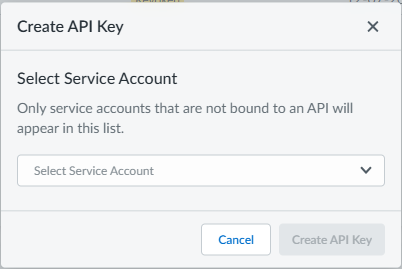
- Log in to Strata Cloud Manager and navigate to .Select Create New Key.This button is only available if there are no existing NGFW or Prisma Access API keys (including unmigrated keys) in the tenant. If you do not see this option, migrate or revoke existing keys first.Select a service account from the dropdown to bind to the API key.The service account credentials (Client ID and Client Secret) are used to generate access tokens for API authentication. Each API key must be mapped to a unique service account.If no service accounts are available, create one in . Ensure the service account is assigned the All Apps & Services scope with a custom role that includes the iam.service_account and iam.custom_role permissions. For details, see Add Service Accounts.
![]() Select Create API Key.The new API key displays in the Keys List. The Status changes from Pending to Valid once synchronization is complete.After the API key status changes to Valid, you can use the bound service account credentials to generate an access token for WildFire API requests.
Select Create API Key.The new API key displays in the Keys List. The Status changes from Pending to Valid once synchronization is complete.After the API key status changes to Valid, you can use the bound service account credentials to generate an access token for WildFire API requests.